JSR-310 관련해서 멘토링을 진행 하던 중 과연 LocalDateTime 동작원리에 대한 부분을 질문 받았으나 대답하지 못하였다. 단지 불변객체이며 기존 Date와 Calendar를 대신한다는 점이지만 실제로 모르고 사용했을 때 발생되는 문제에 대한 시나리오를 제공받았으며 이를 테스트를 해보고 해결하기 위한 방향으로 학습을 하게되었다
가장 먼저 학습한 것은 과연 LocalDateTime.now()는 어떻게 타임존은 어떻게 가져오는지이다
LocalDateTime 타임존은 어떻게 가져올까
LocalDateTime.now();
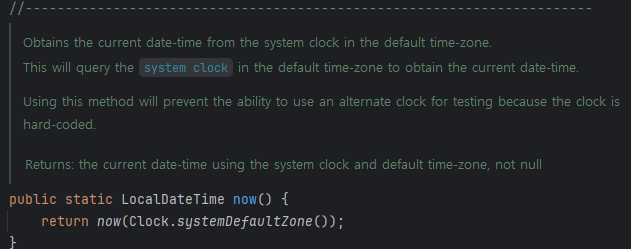
메소드를 타고 들어가면 Clock의 SystemDefaultZone을 가져온다. 실제로 그렇다면 어떻게 이 값이 지정되는 지 찾아가보았다
private static synchronized TimeZone setDefaultZone() {
        TimeZone tz;
        // get the time zone ID from the system properties
        Properties props = GetPropertyAction.privilegedGetProperties();
        String zoneID = props.getProperty("user.timezone");

        // if the time zone ID is not set (yet), perform the
        // platform to Java time zone ID mapping.
        if (zoneID == null || zoneID.isEmpty()) {
            zoneID = getSystemTimeZoneID(StaticProperty.javaHome());
            if (zoneID == null) {
                zoneID = GMT_ID;
            }
        }

        // Get the time zone for zoneID. But not fall back to
        // "GMT" here.
        tz = getTimeZone(zoneID, false);

        if (tz == null) {
            // If the given zone ID is unknown in Java, try to
            // get the GMT-offset-based time zone ID,
            // a.k.a. custom time zone ID (e.g., "GMT-08:00").
            String gmtOffsetID = getSystemGMTOffsetID();
            if (gmtOffsetID != null) {
                zoneID = gmtOffsetID;
            }
            tz = getTimeZone(zoneID, true);
        }
        assert tz != null;

        final String id = zoneID;
        props.setProperty("user.timezone", id);

        defaultTimeZone = tz;
        return tz;
    }
위 코드에 내용을 하나씩 디버깅해보면 Props에서 타임존을 가져온다. 그리고 그 내용이 없을 경우 GMT 시간으로 설정되는 걸 볼 수 있는데 다양한 환경에서 타임존을 검색한다. 그렇기에 혼동이 발생될 수 있기에 아래와 같이 우선순위는 정리해보았다
우선순위(리눅스 기준)
- JVM 매개변수
- Duser.timezone
- TZ 환경 변수 설정
- export TZ=Asia/Shanghai
- /etc/timezone
- /etc/localtime
출력을 위한 테스트 코드
public class Main {
    public static void main(String[] args) {
        System.out.println(TimeZone.getDefault().getID());
        System.out.println(LocalDateTime.now());
    }
}
테스트1. VM Option에서 Timzone을 지정한다
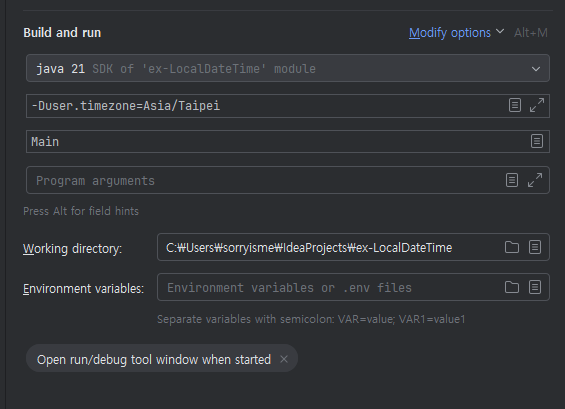


인텔리제이와 리눅스에서 모두 정상적으로 타임존이 적용되는 걸 확인할 수 있었다
테스트2. VM Option과 Profile 우선순위 확인

리눅스 상에 ~/.bash_profile에 TZ를 적용한 것과 VM Option을 비교했을 때 우선순위가 VM Option이 높다는 걸 확인할 수 있었다
시나리오 테스트
- 한국유저 한테 요청을 받음
- 서버는 한국에 위치해있다.
- 데이터베이스 서버도 한국에 위치해있다
- 대만 관리자가 데이터를 조회한다. 이 경우 대만 시간으로 조회되어야 한다.
Client 코드 ( 타임존 Asia/Taipei)
    @PostMapping("/request")
    public String request() {

        LocalDateTime localDateTime = LocalDateTime.now();
        RestTemplate restTemplate = new RestTemplate();
        ResponseEntity<String> response = restTemplate.postForEntity("http://192.168.0.42:8080/insert", localDateTime, String.class);

        // 현재 시스템의 시간대 가져오기
        TimeZone timeZone = TimeZone.getDefault();
        ZoneId zoneId = timeZone.toZoneId();
        log.info("System Zone ID: " + zoneId);

        return response.getBody();
    }
Server 코드 ( 타임존 Asia/Seoul)
  @PostMapping("/insert")
  public String insert(@RequestBody LocalDateTime localDateTime) {
      try (Connection conn = DriverManager.getConnection("jdbc:mysql://192.168.0.47:3306/localdate?serverTimezone=Asia/Seoul", "root", "rlawltjd39")) {

          log.info(localDateTime.toString());

          String insertQuery = "INSERT INTO tb_timezone (fd_datetime, fd_timestamp) VALUES (?, ?)";
          PreparedStatement pstmt = conn.prepareStatement(insertQuery);

          Timestamp timestamp = Timestamp.valueOf(localDateTime);

          pstmt.setTimestamp(1, timestamp);  // fd_datetime 컬럼
          pstmt.setTimestamp(2, timestamp);  // fd_timestamp 컬럼

          // 쿼리 실행
          int rowsInserted = pstmt.executeUpdate();

          if (rowsInserted > 0) {
              Statement stmt = conn.createStatement();
              ResultSet resultSet = stmt.executeQuery("select fd_datetime, fd_timestamp from tb_timezone");

              if (resultSet.next()) {
                  log.info(resultSet.getTimestamp("fd_datetime").toString());
                  log.info(resultSet.getTimestamp("fd_timestamp").toString());
              }
          }

      } catch (Exception e) {
          e.printStackTrace();
      }

      return "";
  }
최종 결과
- 타임존을 포함하지 않는 값이 전달됨
- 타이페이 타임존 시간으로 dateTime, Timestamp 모두 들어가버림
- 허나 추후 다시 조회할 경우 서울 시간으로 인식하기 때문에 문제가 발생함
해결방안1 (ZonedDateTime)
Client (Taipei)
@PostMapping("/request")
public String request() {

    ZonedDateTime zonedDateTime = ZonedDateTime.now();
    RestTemplate restTemplate = new RestTemplate();
    ResponseEntity<String> response = restTemplate.postForEntity("<http://192.168.0.42:8080/insert>", zonedDateTime, String.class);

    TimeZone timeZone = TimeZone.getDefault();
    ZoneId zoneId = timeZone.toZoneId();
    log.info("System Zone ID: " + zoneId);

    // log.info("Response from server: " + response.getBody());
    return response.getBody();
}
Server(Seoul)
  @PostMapping("/insert")
  public String insert(@RequestBody ZonedDateTime zonedDateTime) {
      try (Connection conn = DriverManager.getConnection("jdbc:mysql://192.168.0.47:3306/localdate?serverTimezone=Asia/Seoul", "root", "rlawltjd39")) {

          log.info(zonedDateTime.toString());

          String insertQuery = "INSERT INTO tb_timezone (fd_datetime, fd_timestamp) VALUES (?, ?)";
          PreparedStatement pstmt = conn.prepareStatement(insertQuery);

          Timestamp timestamp = Timestamp.from(zonedDateTime.toInstant());
          log.info(timestamp.toString());

          pstmt.setTimestamp(1, timestamp);  // fd_datetime 컬럼
          pstmt.setTimestamp(2, timestamp);  // fd_timestamp 컬럼

          // 쿼리 실행
          int rowsInserted = pstmt.executeUpdate();

          if (rowsInserted > 0) {
              Statement stmt = conn.createStatement();
              ResultSet resultSet = stmt.executeQuery("select fd_datetime, fd_timestamp from tb_timezone");

              if (resultSet.next()) {
                  log.info(resultSet.getTimestamp("fd_datetime").toString());
                  log.info(resultSet.getTimestamp("fd_timestamp").toString());
              }
          }

      } catch (Exception e) {
          e.printStackTrace();
      }

      return "";
  }
- 로그에 찍히는 값 ⇒ 2024-10-28T09:40:43.775161856Z
- 허나 이 방식은 결국 UTC 시간으로 처리한다
- 그렇다면 만약에 Sequence를 타임스탬프로 했을 때 태국과 서울의 시간차이는 어떻게 극복할 건지 (운영적인 문제)
- 운영적으로 편할려면 결국 타임존을 하나로 일치시키는 것도 하나의 방법으로 볼 수 있다
MySQL DATE VS DATETIME VS TIMESTAMP
- Date :시간을 제외한 날짜를 저장하는 타입
- DateTime: 날짜와 시간을 저장할 수 있는 타입
- TimeStamp: 날짜와 시간을 타임스탬프로 저장하는 형태
- 시스템의 타임존에 의존한다
- DateTime은 문자형으로 저장, 타임스탬프는 숫자형으로 저장
SET GLOBAL time_zone='Asia/Taipei';
SET time_zone='Asia/Taipei';
select * from tb_timezone;
SELECT @@global.time_zone, @@session.time_zone;

- timestamp의 경우에는Mysql 타임존에 따라서 시간이 변경된다
JDBC와의 연동 테스트
코드
    @GetMapping("/mysql")
    public String mysql() {

        try (Connection conn = DriverManager.getConnection("jdbc:mysql://192.168.0.47:3306/localdate?serverTimezone=Asia/Seoul", "root", "rlawltjd39");){

            Statement stmt = conn.createStatement();
            ResultSet resultSet = stmt.executeQuery("select fd_datetime, fd_timestamp from tb_timezone");

            if(resultSet.next()) {
                log.info(resultSet.getTimestamp("fd_datetime").toString());
                log.info(resultSet.getTimestamp("fd_timestamp").toString());
            }

        } catch (Exception e) {
            e.printStackTrace();
        }

        return "";
    }
- Mysql Timezone은 Asia/Taipei
- JDBC Timezone설정은 Asia/Seoul


참고
https://velog.io/@ashappyasikonw/Java-프로젝트에서-Default-Time-Zone은-어떻게-설정되는가
'BackEnd > JAVA' 카테고리의 다른 글
| Heap Dump (0) | 2025.12.29 |
|---|---|
| RSA를 이용한 민감정보 암호화 적용 (0) | 2025.12.15 |
| [자바 JVM 모니터링]VisualVM을 통한 모니터링 해보기 (0) | 2024.10.30 |
| [용어정리] JCP, JSR, JSR-310 정리 (0) | 2024.10.16 |
| 실수형 표현이 정확하지 않은 이유? (0) | 2024.10.05 |
